Supervisión de exámenesExámenesEvaluaciones en computadora
Remote proctoring checklist for training providers
A practical checklist for planning a live remote exam: candidate readiness, identity, invigilator procedures, incident handling and the rehearsal that ties them together.
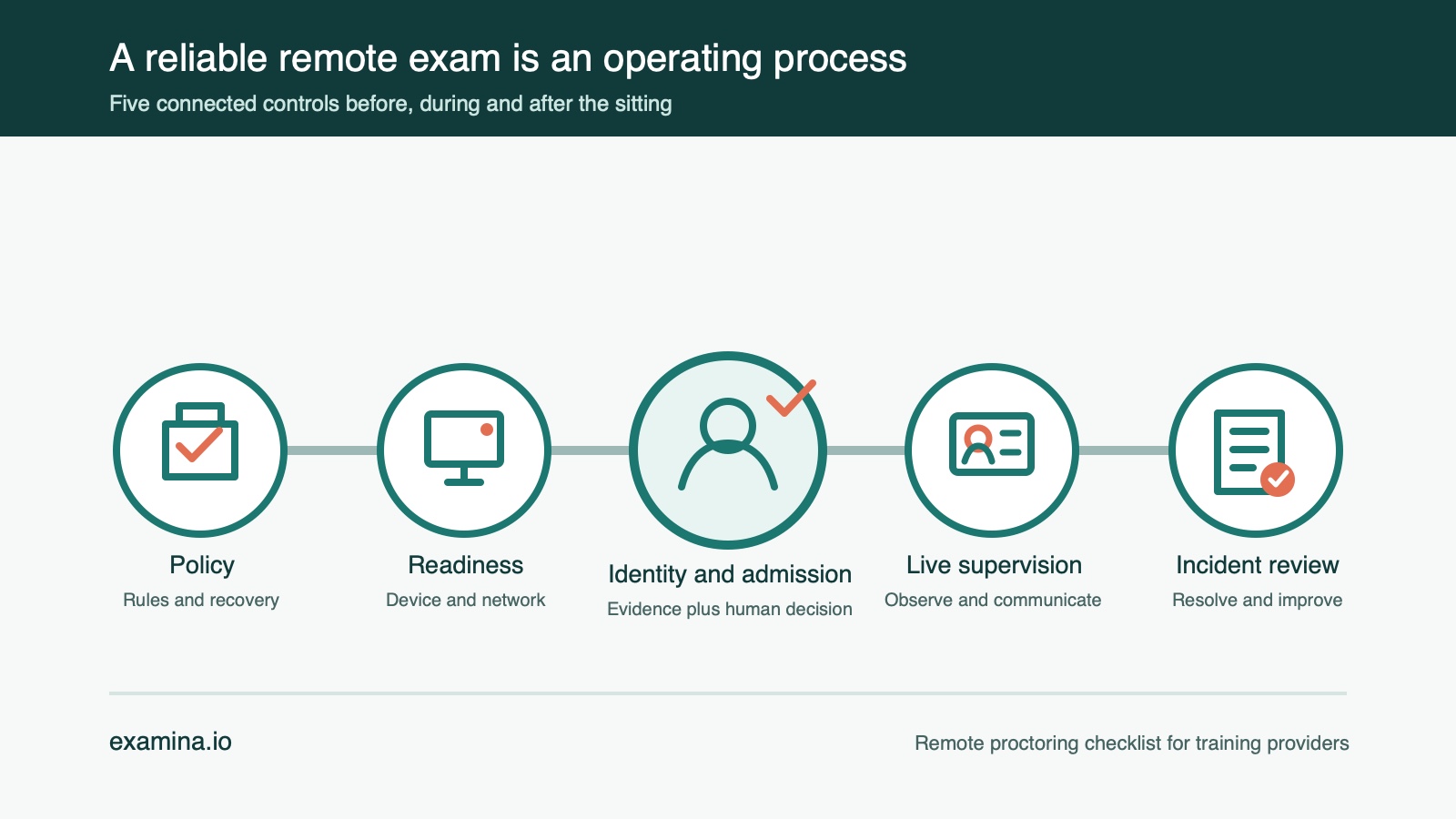
A remote exam can fail before the first question appears. A candidate may discover that the browser cannot access the camera. An invigilator may not know whether a brief disconnect should pause the attempt. A strong identity check may still leave nobody responsible for deciding what happens when the result is uncertain.
These are operating problems, not simply software problems. The National Commission for Certifying Agencies says live remote proctoring can support certification standards when it is implemented thoughtfully. Its guidance focuses on candidate communication, standardised administration, trained proctors, accommodations and incident handling, not on video alone.
For a training provider, the useful question is therefore not “Do we have proctoring?” It is “Can we run the same defensible process for every candidate?” This checklist turns that question into work you can complete before exam day.
1. Write the rules before configuring the exam
Start with what the assessment is meant to protect. A short course quiz and a certification decision do not carry the same consequence, so they should not automatically use the same controls.
Document:
- what materials and devices candidates may use;
- whether breaks are allowed and how they are supervised;
- which identity evidence is required;
- what the invigilator must verify before authorising a start;
- what counts as a technical interruption rather than a conduct concern;
- who decides whether an interrupted attempt resumes, restarts or is rescheduled; and
- which accommodations or alternative delivery routes are available.
Make the candidate-facing version short enough to read. The operational version can be detailed, but the person sitting the exam needs a clear summary before accepting the rules.
This policy is the foundation for every later decision. Without it, two invigilators can see the same event and make different calls. That inconsistency can damage confidence in the result even when the technology works exactly as designed.
2. Give candidates a real readiness check
Do not make exam day the first time a candidate opens the assessment link. Major certification programmes ask candidates to test the same computer, network and location they intend to use for the exam. That is practical advice for any training provider.
Your pre-exam instructions should cover:
- a supported, current browser on a laptop or desktop;
- permission to use the camera and microphone;
- permission to share the required screen;
- a stable connection and a fallback plan for a short interruption;
- a private, adequately lit space;
- the permitted and prohibited materials; and
- enough time to complete identity and device checks before the scheduled start.
Corporate networks and managed computers deserve particular attention. Security software, browser policies and network filtering can block media or screen sharing even when ordinary websites work. Ask candidates to run the device check on the actual equipment and connection they will use.
The examina.io candidate troubleshooting guide gives candidates a focused path for camera, microphone, screen-sharing and connection problems. Send that guidance before the sitting, not after a failure.
3. Separate identity from admission
Identity verification and exam admission answer different questions. Identity verification asks whether the person presenting is the expected candidate. Admission asks whether all conditions are acceptable for this particular attempt.
For higher-stakes assessments, a workflow may combine an enrolled reference photo, a liveness check and a comparison result. That result should not become an automatic accusation. Define a human-review path for an uncertain match, a provider failure and a candidate who needs a non-biometric alternative.
The NIST identity-proofing guidance is broader than exam delivery, but its separation of evidence, validation, verification and presentation-attack resistance is useful. It reinforces a practical point: one captured image is not the whole identity process.
After identity is resolved, the invigilator should still verify the live session. In examina.io, that means confirming the candidate’s webcam and shared screen before authorising the attempt. The eFaceID guide explains the consent, liveness, review and non-biometric paths; the identity result supports the invigilator’s decision rather than replacing it.
4. Give invigilators a runbook, not just a dashboard
An invigilator needs to know what to do when the session is ordinary and when it is not. The runbook should define the order of checks, the allowed interventions and the escalation path.
Before authorising a candidate, the invigilator should be able to confirm:
- the expected candidate and exam are selected;
- identity requirements have been completed or reviewed;
- webcam video is visible and usable;
- the required screen is being shared;
- the candidate understands how messages and interruptions will be handled; and
- the attempt is ready to begin.
During the exam, tell invigilators when to message, when to pause for clarification, what to record as an incident and who makes the final conduct decision. Proctoring produces observations; it does not prove intent on its own.
The NCCA’s programme considerations specifically call for proctor training on monitoring, escalation, irregularities, assignment and coverage. Even when accreditation is not relevant to your organisation, those are sensible controls for comparable treatment.
The examina.io live proctoring guide provides the product workflow from candidate setup through authorisation, monitoring and incident response.
5. Decide how failure and re-entry work
Every remote exam needs a recovery rule. A lost connection, closed browser or expired session should not force staff to invent a policy while a candidate waits.
Define:
- how long the candidate may try to reconnect;
- whether the timer continues during an interruption;
- how the invigilator confirms that the returning person is the same candidate;
- whether the same attempt resumes or a replacement attempt is created;
- when an incident requires review before a result is released; and
- how the candidate receives a decision or rescheduling instruction.
Treat re-entry as part of the original attempt wherever the assessment rules permit it. Creating a new attempt for every refresh or short disconnect complicates results, audit history and billing. At the same time, repeated or long interruptions may justify a human decision rather than an automatic resume.
Keep the message shown to candidates plain. “Connection lost; attempting to reconnect” is actionable. An internal error code or localisation key is not.
6. Rehearse the whole process, then review it
A device test proves only the device test. Before the first consequential sitting, run a small rehearsal that includes a candidate, an invigilator and the person responsible for support.
Exercise at least one normal admission and one interrupted session. Confirm that the team can find the candidate, complete the checks, authorise the start, communicate during the attempt, reconnect when appropriate and record the outcome.
Afterward, review where time was lost:
- candidates who reached exam day without completing setup;
- camera, microphone or screen-sharing failures;
- identity results that required review;
- delays between readiness and invigilator authorisation;
- disconnects and successful re-entry; and
- incidents that lacked a clear owner or resolution.
The purpose is not to eliminate every exception. It is to make exceptions visible, owned and consistently resolved.
The checklist to carry into exam day
Before opening the session, confirm that:
- the exam rules, break policy and permitted materials are published;
- accommodations and non-biometric alternatives are resolved;
- candidates received the device and environment instructions;
- identity evidence and review responsibilities are defined;
- invigilators have the roster, permissions and escalation runbook;
- a support contact is available;
- reconnect, abandonment and rescheduling rules are written; and
- the full workflow has been rehearsed.
Live proctoring is strongest when it is one part of a documented assessment operation. It can establish presence, support controlled admission and give an authorised invigilator a live view of the session. It cannot replace sound assessment design or human judgement.
examina.io brings exam delivery, device checks, identity verification and live supervision into the same attempt while keeping the admission decision with your authorised invigilator. You can request a conversation about a controlled pilot.